
What are Magic Links and how do they work?
With Magic Links you can send one gift link or QR code to multiple people, and each person can select the gift they want. You don’t need their email addresses or a list of individual gift links.
To send gifts with a Magic Link or Magic Link QR code:
1. Go through the standard Send A Gift flow.
2. When you reach the Recipients page, select Create Single Magic Link/QR Code. Specify the maximum number of gift redemptions you want to allow and the expiration date for the gifts.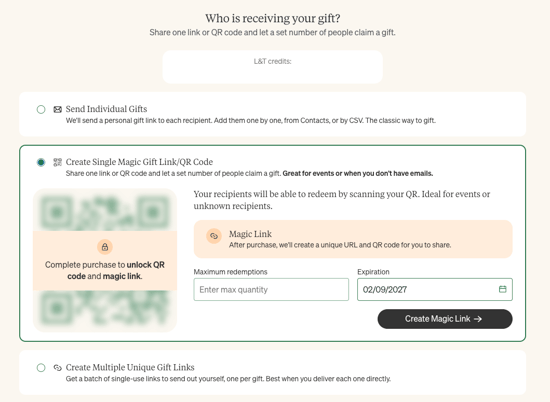
3. Complete the review and check out process as usual.
4. Share your link or QR code with your intended audience. (Remember, with Magic Links no gift emails will be sent automatically!)
Who can send Magic Links?
Any Loop & Tie user with a paid subscription, from Essentials up to custom plans, or a Preferred plan.
What if someone tries to claim more than one gift?
Magic Links limit gift redemptions to one per email address and mailing address. If you'd like to over-ride these setting and allow multiple redemptions per email address or household, reach out to your Account Manager or sales@loopandtie.com for help.
What happens when all of the gifts are claimed?
Anyone who visits the gift link after all gifts are claimed or after the link expires will see a message letting them know the gift-giving has ended.
What if there are unclaimed gifts when the link expires?
Just like with unclaimed standard Loop & Tie gifts, any unclaimed gift credits will be returned to your account.
When should I use a Magic Link and when should I send a standard Loop & Tie gift?
Standard Loop & Tie gifts are great for everyday and holiday gifting, especially when you know the recipients' email addresses. Your recipients will receive the standard gift email when the gift sends, and you'll have individual tracking to be able to see who has redeemed their gift, as well as what they picked.
If you don't have everyone's email address or you want to send the gift emails yourself, but you still want individual links, you can select the "Create Multiple Unique Links" option during the Recipient stage.
Magic Links are great for in-person events or for including on mass communications, like a bulk email or print collateral. Include a gift URL in your print collateral or sales sequences. Share a gift QR code on-screen during a speaking engagement or on signage for an event. You could even put a Magic Link URL or QR code on a Jumbotron at a sports event! The only limit is your imagination.