
Why connect your HRIS with Loop & Tie?
Once you’ve connected your HRIS platform you’ll have access to your full employee list in Loop & Tie to send gifts, and you can build automations to send gifts for employee birthdays or work anniversaries. Boost morale and retain your top talent with simple but meaningful gifting moments. Best of all, it’s an easy process that doesn’t require your product or engineering team’s support.
Which Loop & Tie plans include HRIS integration capabilities?
Essentials users can add HRIS integration to their plan for $1,500. Reach out to your account manager for more information on how to get started. For users on our Premium and Built For You plans, HRIS integration is included.
How to Integrate Your HRIS
- Log into your Loop & Tie account
- In the left-hand navigation menu, go to Contacts
- On the Contacts page, click the Integrations button in the upper-right corner
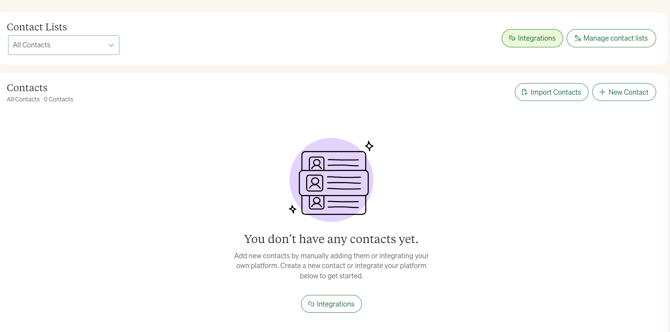
- Select or search for your HRIS provider. Once you find it, click to begin the integration process. All you have to do is follow the authentication steps on the pop-up screen.
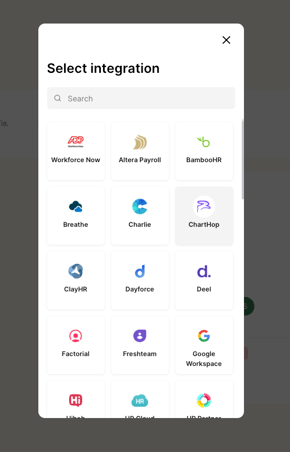
**Note: You must be an Administrator in your HRIS platform to complete the integration.
That’s it! You can now find all of your employees listed on the Contacts page in Loop & Tie and can build out gift flows on the Automations page.
Which HRIS platforms does Loop & Tie integrate with?
In short, almost all of them! We integrate with all of the major platforms, including Rippling, Workday, JustWorks, Bamboo, ADP, Okta, TriNet, Sage HR, Paychex, and more - over 60 HRIS platforms in total. To see if we can integrate with your HRIS, use our integrations search tool or visit the Integrations page in your Loop & Tie account.
❓Need Help?
If you have questions or run into any trouble while integrating your HRIS, our team is here to help! Reach out to support@loopandtie.com